
Eddy docs
Working with Eddy
Changing an edit by chat, undoing changes, the one-click AI Tools, and sending the team feedback.
Ask in chat
The chat panel is where you talk to the editor. Say what you want in plain words, like "show my screen while I list the models" or "cut the part where I restart". Eddy shows you what it changed. Most changes land straight away; a few wait for you to press Apply.
- A chat that isn't tied to part of the video is the Editor. It can work on the whole video.
- A chat you open on a scene, or on words you selected, is a Sub-editor. It can change only the scenes it was opened on and the layers in them, and anything else it tries is refused. Motion graphics are the one exception: they're tied to your words, not to a scene, so a Sub-editor can add them anywhere.
- You can have several chats open in tabs.
- The box where you type has a model picker and an effort setting.
Undo and Apply
Most changes apply straight away, whether you ask in chat or click an AI Tool, and you can undo them:
- A change that applied straight away shows a result line with its own Undo, which takes back exactly that change.
- The header has Undo and Redo, and Cmd+Z works too.
- Every cut keeps the reason it was made, such as a retake, a filler word, a stutter or a long pause. Undoing a cut puts the words back.
- If a later change touched the same thing, undo the later one first.
One kind of change isn't in Undo yet: when the editor rewrites its plan for the edit (such as the sound plan or which Shorts to make), the new plan replaces the old one.
Some chat changes wait on a card until you press Apply (or Reject):
- a change that deletes a layer;
- a change from the Editor that adds or removes scenes, or changes the timing, layout, transition or design of scenes, in more than one scene at once (changes to layers, cuts and motion graphics don't count);
- a style measured from a reference video you pasted into chat;
- a change the editor asks you to check first.
A change you applied from a card has no Undo of its own. Use the header's Undo or Cmd+Z.
Instant changes only apply inside your project on your Mac. Uploading to YouTube only happens when you click Upload yourself. Editing itself does send your transcript, other relevant text and a few selected frames to ChatGPT or Claude; Privacy lists exactly what goes where.
AI Tools
The AI Tools bar has one-click actions for common jobs. Style all scenes has no button yet: ask for it in chat, or have an agent on the same Mac run it.
| Tool | Where it is | What it does | Can cut parts of the video |
|---|---|---|---|
| Edit for clarity | Button in the AI Tools bar | Finds whole sentences you said more than once and keeps only the last one. It ignores capitals, punctuation and symbols when it compares them, so two sentences that differ only in those (like $1.50 and $150) count as the same | Yes |
| Remove filler words | Button in the AI Tools bar | Takes out filler words | Yes |
| Remove retakes | Button in the AI Tools bar | Cuts the false starts, restarts and repeated phrases Eddy marked while reading your recording | Yes |
| Shorten word gaps | Button in the AI Tools bar | Shortens long pauses between words. It never cuts a word | Yes |
| Style all scenes | No button: ask in chat, or an agent on the same Mac runs it | Applies one look (corner rounding or a colour preset) to every layer of one kind, such as every camera shot | No |
| Studio Sound | Always on in the AI Tools bar, no button | Applied automatically when the recording is imported (the app's own words) | No |
Tool names, where each one is, and the last column are generated from the app's source code each time these docs are built. "Yes" means the tool can cut parts of the video, which makes it shorter. Every cut can be undone.
Shorten word gaps shortens any pause longer than 0.3 seconds down to 0.1 seconds by default, and you can change both numbers before you run it. Pauses Eddy already marked as long while reading your recording are the exception: those are shortened the way Eddy's own edit shortens them, whatever the two numbers say.
Like chat, each one applies at once and can be undone.
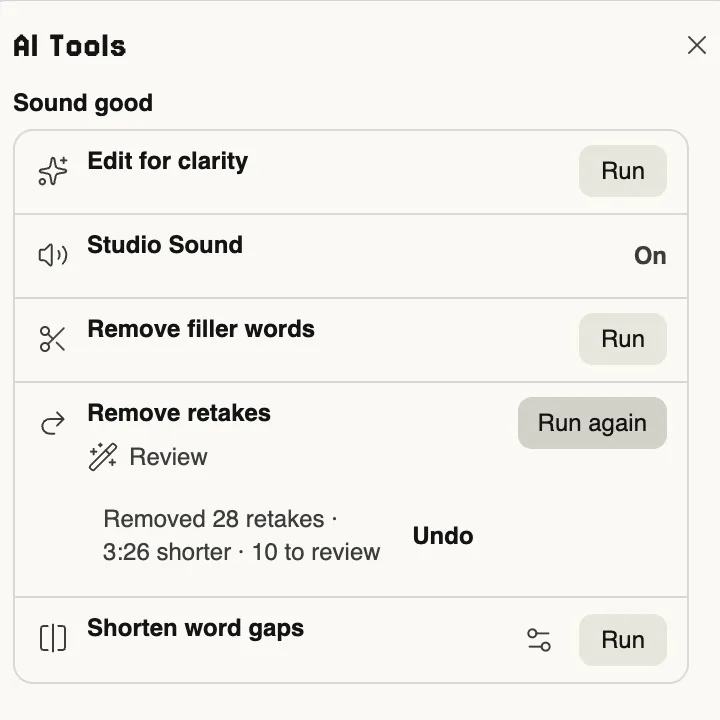
Each tool on a real recording
Each tool below was run in the app on the same real recording as A real recording. Where there is a clip, the "after" is the same stretch of the recording with exactly the cuts the tool made, and nothing else changed.
Remove retakes
On the whole recording, the app said: "Removed 28 retakes · 3:26 shorter · 10 to review".
Remove filler words
Shorten word gaps
On the whole recording, with the default settings, the app said: "Shortened 184 gaps · 37:35 shorter".
Edit for clarity
On the whole recording, the app said: "Ignored 14 duplicated sentences · 0:12 shorter".
Style all scenes
Send feedback (the improvements box)
The Feedback button at the top of the chat panel is how you tell the team what to improve. Write a note in your own words (up to 4,000 characters) and press Send.
- Your note goes with your app version and basic Mac details (macOS version, chip and memory). The form shows these under the box before you send.
- You can tick Add my anonymised session log to include recent edit stages, crash notes and log lines. If you tick it, you see the whole thing before it goes, and Send sends exactly what you saw.
- No footage, files, transcripts or chats are sent.
- Before anything is sent, Eddy removes your home folder path, user name, email addresses and keys from it.
- If Eddy can't reach the team, it keeps the note on your Mac and tells you where.
Notes are stored privately for the Eddy team. The team reads them, and also uses automated AI runs to sort them into its own private task list.
Support reports
If something goes wrong, the Doctor sheet has Send a report to Eddy. It sends your app and Mac details, the health checks, the stages and errors of your recent edits, and recent log lines, all cleaned the same way as feedback. You see the full report before you send it.
Written from the app's source code and last checked against it on 3 November 2026. Tables marked as generated are rebuilt from the source every time, and the build stops if a page disagrees with the app. Not every behaviour here has been hand-tested in the beta build. Something wrong or missing? Email support@eddystudio.ai.